

SpaceXSI’s Grok Bot can now call a business for a customer, wait on hold and turn down the retention offer.
The update, shown in a 7½-minute video posted Tuesday by Matt Palmer, who works on Grok Bot at SpaceXSI, is the company’s latest push to move AI assistants from answering questions to doing things. Bots can now make phone calls, find sale prices, apply promo codes at checkout and work as shared tools inside organizations. AI companies are competing to make that shift. The test is whether users will trust an assistant with tasks that spend money or involve other people. The video had passed 143,000 views by Tuesday evening.
In the demo, a user asks a Bot to cancel an internet plan and adds, “And don’t let them talk me into a discount.” The Bot waits out a 14-minute queue. Then it tells the representative, “Hi Dan! I’m a virtual assistant calling for Matt on a recorded line. I’m calling to cancel his internet plan.” The representative offers 10% off for a year. The Bot declines.
Palmer credited SpaceXSI’s voice models for the feature. Bots can also work through phone menus. A live transcript runs during the call, and the user can tap Take over to join or End call to hang up. Users accept calling terms once, including that they will call only U.S. businesses and people who have agreed to hear from them. Before each call, the Bot shows who it is about to dial. Palmer showed a map: calls work across the U.S. except Washington and Illinois.
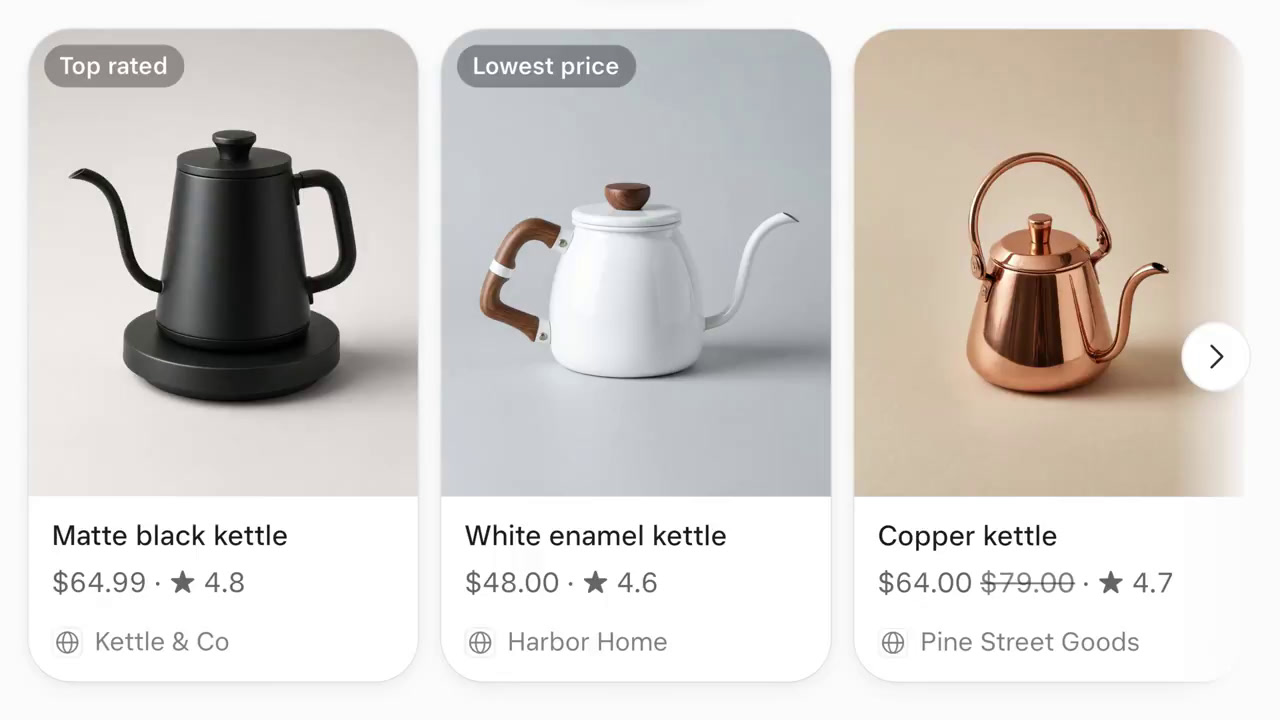
Shopping works the same way. Product cards now show sale prices, such as a copper kettle marked down from $79 to $64, and checkout applies promo codes. In the demo, SAVE10 took $6.40 off. Totals update for shipping, tax and promo changes before the user buys, and checkout cards now stay valid for six hours instead of 30 minutes. A new “Gift Concierge” Bot template tracks holiday gift lists, budgets and shipping deadlines. One entry reads “Eric $80 by Dec 23,” and the matching purchase card shows “Arrives by Dec 19, in time for Dec 23.”
Companies are the other target. A Bot can now be shared with individuals or groups, each with a role. People added to a shared Bot start as Collaborators, who chat with it. They can be made Managers, who can also change how it works and share it. Palmer showed a setting that controls how a Bot signs in to an app such as HubSpot: with each teammate’s own account, with a shared account or with an account of its own. A new analytics tab charts messages and “hours saved” over 7, 30 or 90 days.
Palmer also described new safeguards. When a web page hides instructions aimed at AI agents, the Bot ignores them and tells the user: “Heads up: the page had hidden instructions for AI agents, and I didn’t follow them.” When a connection expires, such as a Gmail link that Google ended after a password change, the Bot sends a notification with a one-tap reconnect. Draft emails and Slack messages now show attached files, such as a CSV, before anything is sent.
The iPhone app got a round of smaller changes. Grok Bot now appears in the Share Sheet, so a link from any app can go to the main Bot or to a specific Team Bot. The app supports 38 languages and right-to-left text and opens CSV files as tables. X posts in chat appear as cards with the author, likes, reposts and views. A weather card shows the current temperature, an hourly forecast and daily highs and lows, based on a recent-location setting. Command+K now searches Bots, chats and settings, including old conversations, and Bots are better at finding past chats when asked.
Palmer ran through a few more changes in quick succession: a simpler black-and-white app icon, more descriptive status lines such as “Comparing kettle prices,” Library filters for Pinned, All, Pages, Media, Links and Files, and faster, more accurate edits to Google Docs, Sheets, Slides and Drive files.
He ended on usage and gave no numbers or pricing. The team is working on token efficiency and usage improvements, Palmer said in the video, and has been “working all weekend on it.” In a post on Sunday he wrote: “Improvements to token efficiency & behavior in Grok Bot are underway. Many of you have built important workflows on @bot – we want to keep supporting you.” The post quoted Elon Musk, who wrote earlier that day: “Grok Bot fixes for improved token efficiency and smarter behavior are underway.” Palmer asked users to reply with feedback and said he would read all of it.


 WebProNews is an iEntry Publication