
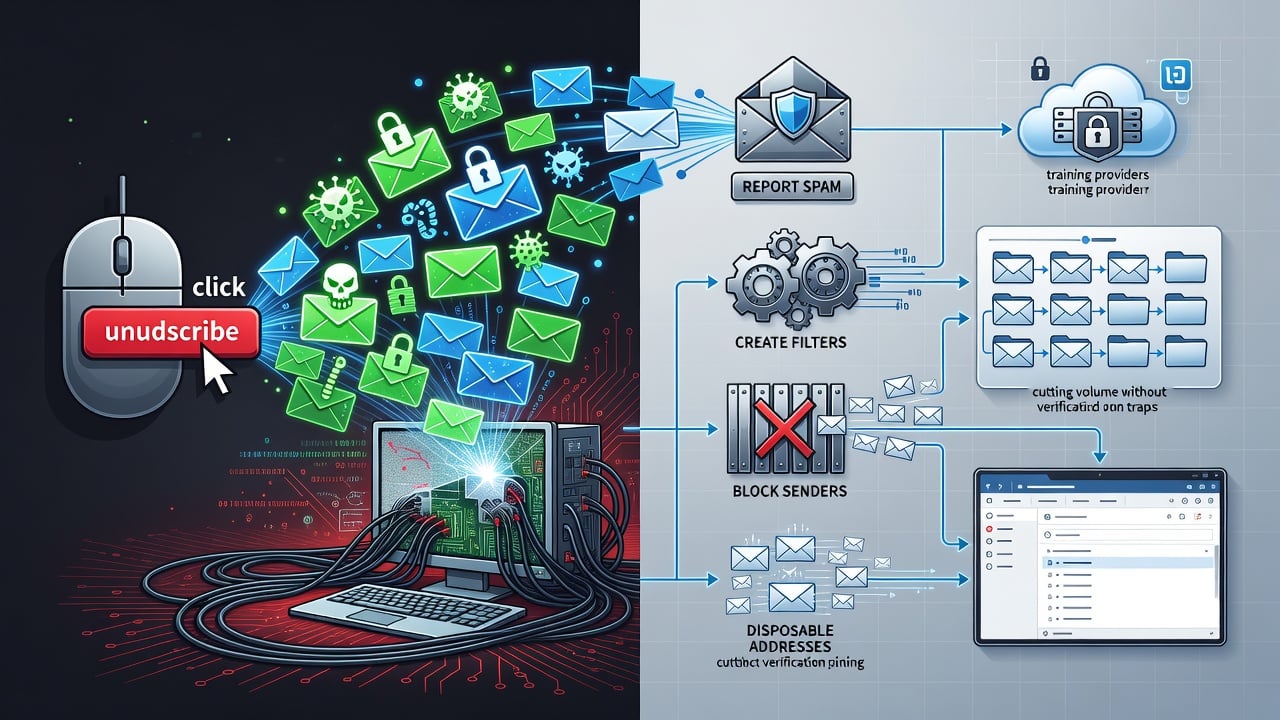
Spam fills inboxes at an alarming rate. One click on that unsubscribe link at the bottom seems like the obvious fix. But security experts warn it often backfires. The action tells spammers your address lives. They add it to better lists. More junk arrives. Sometimes far worse follows.
MakeUseOf laid out the core problem in a fresh piece today. Scammers plant fake unsubscribe buttons. Click them and you confirm a real human reads the mail. https://www.makeuseof.com/never-click-unsubscribe-heres-the-real-way-to-stop-spam/. Your address gains value. Sellers trade it across networks. The flood intensifies. And those links can hide malware or phishing pages. One wrong tap downloads spyware. Another steals credentials.
The Wall Street Journal explored this trap last year. Heidi Mitchell reported how the button tests whether accounts stay monitored. Criminals build profiles of responsive users. They target them harder. https://www.wsj.com/tech/cybersecurity/unsubscribe-email-security-38b40abf. The pattern repeats across campaigns. Legitimate marketers follow CAN-SPAM rules and honor opt-outs. Fraudsters ignore them. They exploit the convention instead.
Forbes weighed in months earlier. Morey Haber, chief security advisor at BeyondTrust, detailed the chain. A click might download ransomware or redirect to credential-harvesting sites. It verifies the address for resale. https://www.forbes.com/councils/forbestechcouncil/2024/10/15/the-risks-of-the-unsubscribe-button-in-emails/. The risk compounds. One interaction marks you as active. Lists multiply. Attacks grow personal.
Recent analysis sharpens the numbers. RSA Conference researchers noted one in every 644 unsubscribe clicks lands on a malicious site. Masha Sedova, vice president of human risk strategy at Mimecast, explained the mechanics. “The way the attack works is it confirms that the inbox receiving this phishing attack is legitimate and there’s a real human clicking the link.” Attackers cull inactive addresses. They focus resources on live ones. https://www.rsaconference.com/library/blog/unsubscribe-safely-navigating-the-risks-of-email-opt-outs.
Perry Carpenter, chief human risk management strategist at KnowBe4, described the deception. “Cybercriminals can build emails to hide the true URL string behind seemingly innocuous text.” The message looks like ordinary junk. The footer promises relief. The destination serves the attacker’s purpose. It is simple to craft. It works often enough to stay profitable.
Smarter habits beat the button.
Start by examining every suspicious message. Hover over the sender. Check the actual domain. Official Amazon mail comes from amazon.com. Anything from [email protected] signals trouble. Look inside the body. Real companies use your name. They reference recent orders. Spam deploys generic greetings and manufactured urgency. “Your account closes in 24 hours” rarely proves true.
Headers offer further clues. SPF and DKIM records show whether the mail traveled from authorized servers. Many clients surface these details with one click. Absence of proper authentication raises red flags. Yet most users skip this step. They react on instinct. That instinct now needs retraining.
Never reply. A response proves the address works. Spammers note it. They sell the confirmation. Targeted follow-ups arrive soon after. The cycle accelerates. Reporting spam trains the provider’s filters instead. Gmail, Outlook and others improve detection from user feedback. Mark the message. It vanishes from view. Similar mail heads to junk automatically next time.
Blocking specific senders adds precision. Future messages skip the inbox. They drop straight into spam. Combine reporting and blocking for persistent offenders. The dual action starves their reach while sharpening platform defenses. And when an email looks like phishing, report it as such. Providers share signals across networks. One flag protects thousands.
Filters and rules deliver automation. Identify patterns in subject lines or senders. Route them to folders or trash without manual effort. Gmail makes creation straightforward. Open the message. Choose “filter messages like this.” Set conditions. Apply delete or archive actions. Once saved, the rule runs forever. Repetitive offers disappear quietly. Attention stays on important mail.
Prevention starts earlier. Disposable addresses shield primary inboxes. Services such as 10MinuteMail or Mailinator generate temporary accounts for one-time sign-ups. They expire. Junk never reaches you. Gmail users enjoy a built-in variant. Append +news or +shopping to the username. Messages still arrive but carry the tag. Filters catch them by the plus suffix. The technique reveals who sold or leaked the address.
Recent discussions on X echo these points. Users repeat the warning daily. “Don’t unsubscribe from spam. That click just confirms your email is live and gets you more of it. Block, mark as spam, delete,” one account advised on July 8. The consensus holds. Engagement validates. Silence and reporting starve the system.
A 2025 Total Defense post reinforced the advice two days ago. Shady unsubscribe links worsen phishing and malware exposure. Mark as junk. Let filters learn. https://www.totaldefense.com/security-blog/dont-click-unsubscribe-in-a-spam-email-how-to-avoid-phishing-malware-and-inbox-targeting-scams/. An Asurity analysis from February added that confirmed addresses spread across spam networks. Value rises. Sales accelerate.
Legitimate newsletters differ. If you recall signing up, the unsubscribe link usually works safely. Hover first. Confirm it leads to the real domain. No password prompt should appear. A simple confirmation page suffices. For everything else, treat the button as suspect. The cost of caution runs low. The price of trust runs high.
Email volume keeps climbing. AI helps spammers generate convincing copy at scale. Filters improve yet never reach perfection. Users who adopt verification, reporting, blocking and rules cut their exposure dramatically. They reclaim control. The inbox becomes tool instead of burden. One habit change at a time.
Ignore the unsubscribe temptation in obvious spam. Delete. Report. Filter. Block. These steps starve the lists without feeding the machine. They protect data. They preserve time. And they rest on evidence compiled across years of observed attacks rather than hope that this particular link proves honest.


 WebProNews is an iEntry Publication