

Quantcast
Read WebProNews
With Friends!

Spaces Between Keywords In AdWords Display URLs

More Google AdWords Testing

Get the WebProNews Newsletter:

Seeing some strange Adwords tests this morning, with spaces between words in Adwords display urls when they contain a keyword in (or matched) to the query. Screenshot below for ‘theatre breaks’ as an example.

Notice the spaces in the display urls where the keyphrases within the search query are matched against the keywords within the domain in the display url.
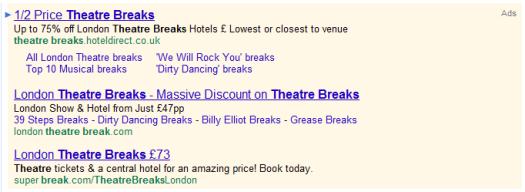
Spaces in Adwords Ads

So ‘superbreak.com’ becomes ‘super break.com’ with a space.

In my opinion this looks odd and is more confusing at a glance. This is obviously something Google are testing and alongside their recent background colour change to yellow, we have no doubt it’s with a view to increasing CTR.

Originally published on PPC Blog

About Dan Sharp
Dan Sharp is the founder and author of the PPC Blog, offering latest news & insights of all things pay per click. Dan is currently employed as a pay per click advertising specialist for one of the UK's top SEM agencies.
Top Rated White Papers and Resources
There are 4 Comments. Add Yours.
  1. Very peculiar. What’s annoying is a client brought this my attention earlier this week and I didn’t have any answers. Now I do. Thanks for sharing

    Reply
  2. Like (0) Dislike (0)
    Cindy Brown

    An odd tweak, for sure. I can see the possibility for breaking urls in places that make no sense or lead to unintended interpretations. I’d be mad if my url were therapist.com and ended up appearing as the rapist.com. I’m assuming Google has some way of avoiding such mishaps.

    Reply
  3. I think it will be confusing for the user, because it looks less like a link to click.

    Reply
  4. I agree. Thought it does make sense improving ctr but it is very confusing for the users. Google is a pro user advocate but this strategy is way beyond that.

    Reply

What do you think? Respond.

Your email address will not be published. Required fields are marked *

*

You may use these HTML tags and attributes: <a href="" title=""> <abbr title=""> <acronym title=""> <b> <blockquote cite=""> <cite> <code> <del datetime=""> <em> <i> <q cite=""> <strike> <strong>