

Submit Your Article
Visit Twellow.com
– Close + Open
Facebook Twitter Google Buzz

Easily Follow WebProNews

Follow us on Facebook, Twitter, Buzz... it's up to you.


Text: Decrease Font Size Increase Font Size | Print Print Article | Share: Delicious Digg StumbleUpon Post to Twitter Post to Facebook


Google Launches New Preview Feature for Font Directory

Preview Fonts for Use with Google's Font API

2 comments Wednesday, July 28, 2010

Google has launched a new feature for its font directory that lets users preview fonts and generates code to use them. The font directory contains fonts that are part of Google's font API.

"Now, whenever you visit the font family page of any of the fonts, you will see a link saying 'Preview this font' that will load your font selection into the font previewer," says Marc Tobias Kunisch with the Google Font API Team. "Here you can edit the text, change its size and line height, and add decorations and spacing among other things. You can even apply text shadow to your text."
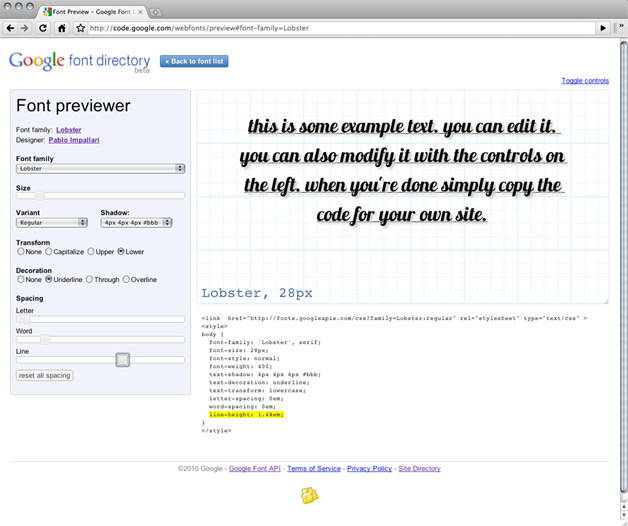
Google Font Previewer launched

The preview will then generate code that you can stick in your style sheet.

"If you want to see the font sample without any distractions from the font previewer controls, you can do that as well simply by clicking 'Toggle controls' in the upper right corner," notes Kunisch. "This will show you a nice clean example of what the font would look like in your design."

The Font API (in beta) lets users add web fonts to any web page.

About the author:
Chris Crum has been a part of the WebProNews team and the iEntry Network of B2B Publications since 2003. Follow WebProNews on Facebook or Twitter. Twitter: @CCrum237

Great tool from Google

What a goog too from Google, do they make any money giving us this?

Publish A Comment

The content of this field is kept private and will not be shown publicly.
  • Web page addresses and e-mail addresses turn into links automatically.
  • Allowed HTML tags: <a> <em> <strong> <cite> <code> <ul> <ol> <li> <dl> <dt> <dd>
  • Lines and paragraphs break automatically.
CAPTCHA
This question is for testing whether you are a human visitor and to prevent automated spam submissions.
11 + 3 =
Solve this simple math problem and enter the result. E.g. for 1+3, enter 4.
SEARCH