

What is by Google’s own admission a "glaringly obvious" missing feature has been added to Google Wave. Now, it’s possible for participants to be removed (or remove themselves) from waves, potentially saving people all sorts of time or embarrassment.
Add someone to a wave by accident? Find out a friend can’t attend the event you’re trying to discuss? This update addresses the fact that you still would have wound up bothering these folks with all sorts of irrelevant messages.
It has another interesting quirk, too. Dhanji R. Prasanna, a software engineer, wrote on the Google Wave Blog (using an amusing Mexican wrestler message as an example), "Imagine this: after a rough day at work, you spend the night out with friends and return home to write a less-than-flattering message to, say, your boss."
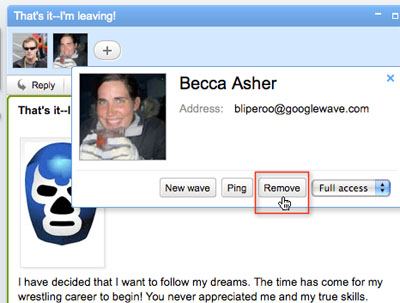
He then hit the important part: "With a wave . . . you simply remove your boss as a participant, and when she wakes up at 7am to check her messages, the wave is gone from her inbox. As long as she didn’t open the wave before you removed her, she will never see it."
These upgrades could help increase Google Wave’s popularity by a significant amount. And further major modifications may be on the way, as well, considering that Prasanna actually characterized the removal option as "one of the more glaringly obvious missing features."


 WebProNews is an iEntry Publication