

Searchers who enjoy knowing what they’re getting into and don’t mind the idea of a slightly less “clean” interface than is normal should appreciate a new feature from Google. This morning, the company unveiled something called Instant Previews.
A post on the Official Google Blog explained, “Instant Previews provides a graphic overview of a search result and highlights the most relevant sections, making finding the right page as quick and easy as flipping through a magazine.”
You can see a screenshot of the feature in action below. It’s also possible to test it out for yourself here. Just conduct a search, then either click on a magnifying glass or navigate to a search result and hit the right arrow key to get started.
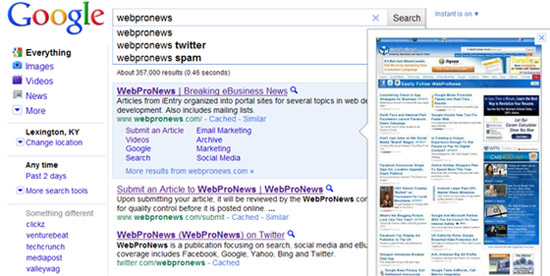 Admittedly, Instant Previews may not be the most indispensable thing ever created; searchers often don’t require a preview, and it’s not so difficult to click on the “back” button after investigating something, in any event.
Still, Google claimed, “In our testing, we’ve found that people who use Instant Previews are about 5% more likely to be satisfied with the results they click. The previews provide new ways to evaluate search results, making you more likely to find what you’re looking for on the pages you visit.”
The feature is rolling out now, and should be available in over 40 languages sometime in the next few days.


 WebProNews is an iEntry Publication