
Google has launched some improvements to its borders for over 60 countries and regions in Google Maps (coming to Google Earth soon).
"Making Google’s mapping tools as accurate as possible is a complex process, especially when a map’s accuracy has both quantitative and qualitative aspects," says Google Geo Policy Analyst Charlie Hale. "We receive spatial data of all kinds – imagery, boundaries, place names, etc. – from a variety of sources worldwide, and we review them carefully before integrating them into the best representation of a given location in Google Earth and Maps."
"In the case of geopolitical features on our maps, the depiction of borders is something upon which local authorities, governments and internationally recognized bodies often disagree," says Hale. "Our goal is to provide the most legible and accurate maps we can given the information available in these oft-changing areas of geopolitical disagreement. Like most maps, ours include symbology that makes borders and other geopolitical features clearer to users."
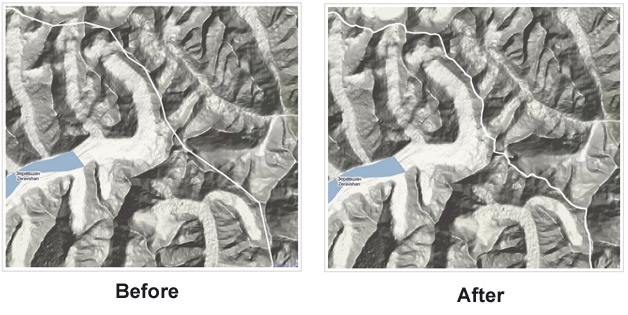
With the update, Google says many borders will more closely follow natural boundaries like mountains and rivers. In some areas Google has changed the symbology of the boundary lines based on political treaties and agreements. In other areas, there is simply just more information provided.
More information and examples of changes can be found here.


 WebProNews is an iEntry Publication